Is there a way to set the Window (frame) minimum height/width? (WinUI 3) #9092

Replies: 3 comments 9 replies

-
|
Indeed, at this time, the WinUI 3 APIs are very specific to windows. Fortunately, most of those APIs were available as part of WinRT and can be used for the other platforms (where Window sizing is applicable): ApplicationView.GetForCurrentView().SetPreferredMinSize(new Size(640, 480)); |
Beta Was this translation helpful? Give feedback.

-
|
Very well. Thank you for your time. |
Beta Was this translation helpful? Give feedback.
-
|
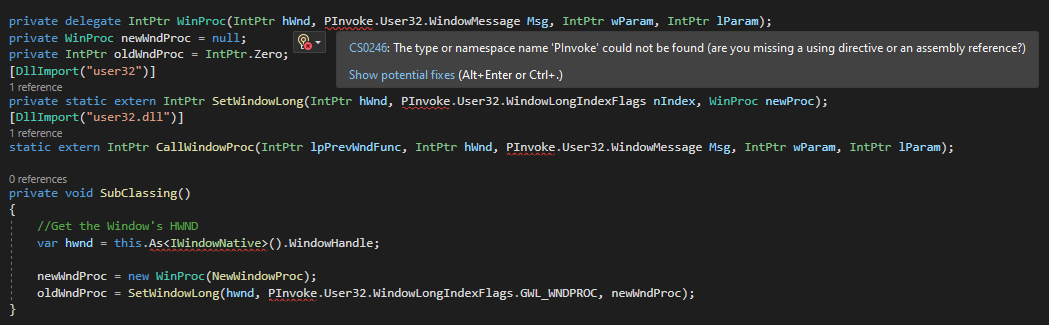
The solution in that discussion brings about two compiler errors for me.
The only difference between my code and the snippet is that the derived type is |

Beta Was this translation helpful? Give feedback.

-
|
You need to make that code conditional to windows, by using |
Beta Was this translation helpful? Give feedback.
-
|
Ah right, didn't know that was crucial to the code. My bad. |
Beta Was this translation helpful? Give feedback.
-
|
Using the static type |
Beta Was this translation helpful? Give feedback.

-
|
This code didn't work for me ApplicationView.GetForCurrentView().SetPreferredMinSize()But another option which works in WINUI3 under windows is to handle the AppWindow.Changed event that fires when the window changes check if the new size is bellow MinWidth or MinHeight and then resize it back to the MinHeight or MinWidth. This isn't an elegant solution as it causes the window to flicker a bit but it does prevent the user from resizing the window smaller than is desired and I use it to set the startup size for my app. /// <summary>
/// Sets the size of the Application Window when running in Windows.
/// </summary>
/// <param name="window"></param>o
/// <param name="width"></param>
/// <param name="height"></param>
/// <returns></returns>
public static bool Resize(Window window, int width, int height)
{
try
{
#if NET7_0_WINDOWS10_0_18362
// Use 'this' rather than 'window' as variable if this is about the current window.
IntPtr hWnd = WinRT.Interop.WindowNative.GetWindowHandle(window);
Microsoft.UI.WindowId windowId = Microsoft.UI.Win32Interop.GetWindowIdFromWindow(hWnd);
AppWindow = Microsoft.UI.Windowing.AppWindow.GetFromWindowId(windowId);
AppWindow.Resize(new Windows.Graphics.SizeInt32 { Width = width, Height = height });
AppWindow.Changed += AppWindow_Changed;
#else
_ = Log.Warn($"{nameof(WindowHelper)}.{nameof(Resize)}() is not currently supported on this platform.");
#endif
return true;
}
catch (Exception ex)
{
_ = Log.Error(ex);
}
return false;
}
private static void AppWindow_Changed(Microsoft.UI.Windowing.AppWindow sender, Microsoft.UI.Windowing.AppWindowChangedEventArgs args)
{
try
{
#if NET7_0_WINDOWS10_0_18362
if (AppWindow == null)
return;
if (AppWindow.Size.Height < MinHeight && AppWindow.Size.Width < MinWidth)
AppWindow.Resize(new Windows.Graphics.SizeInt32 { Width = MinWidth, Height = MinHeight });
else if (AppWindow.Size.Height < MinHeight)
AppWindow.Resize(new Windows.Graphics.SizeInt32 { Width = AppWindow.Size.Width, Height = MinHeight });
else if (AppWindow.Size.Width < MinWidth)
AppWindow.Resize(new Windows.Graphics.SizeInt32 { Width = MinWidth, Height = AppWindow.Size.Height });
#endif
}
catch (Exception ex)
{
_ = Log.Error(ex);
}
} |
Beta Was this translation helpful? Give feedback.

-
|
Easy as pie for WinUI 3 in 2026 if you know what you are doing. Just install public MainWindow()
{
InitializeComponent();
var manager = WinUIEx.WindowManager.Get(this);
manager.PersistenceId = "MainWindow";
manager.MinWidth = 500;
manager.MinHeight = 550;
} |
Beta Was this translation helpful? Give feedback.


Uh oh!
There was an error while loading. Please reload this page.
-
from discord
The only thing I found online was this (microsoft/microsoft-ui-xaml#2945 (comment)) which seems very overcomplicated, and it only works on Windows.
Beta Was this translation helpful? Give feedback.
All reactions